Data exists.
Felt progress doesn't.
01. Business context
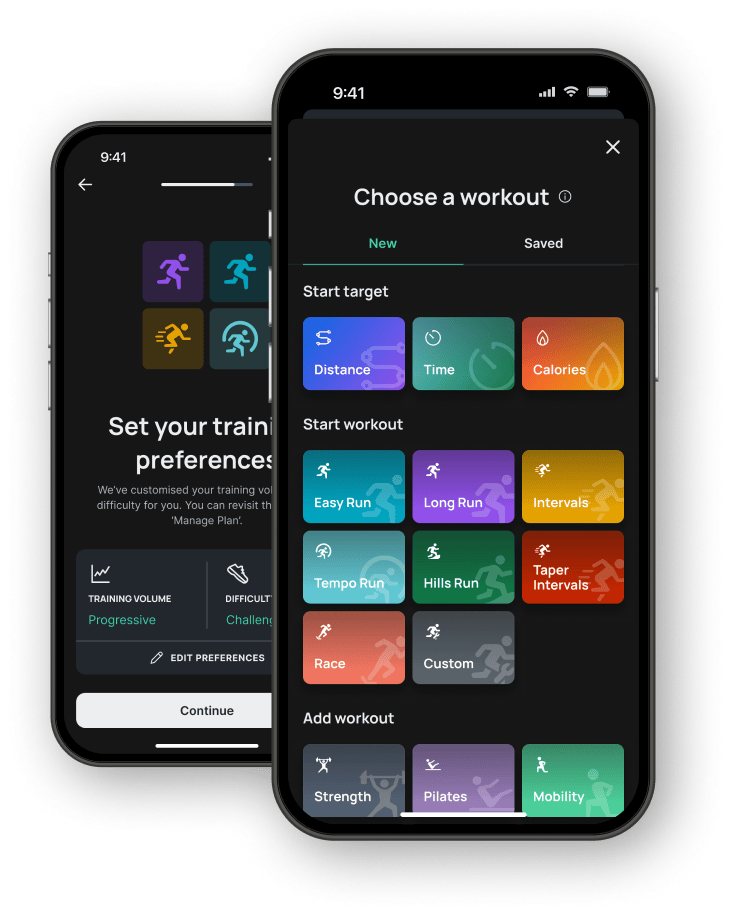
Runna is a mobile coaching app that builds personalised training plans, adapting as you run.
The challenge
Designing with data I couldn't see
I didn't have access to Runna's backend, data schema, or engineering documentation for this project — only the live product itself. Every design decision had to be checked against what the app could actually prove it already captured.
Challenge
Progress Pulse needed to surface signals that make improvement feel real for beginners — pace trends, effort, milestones. But I had no visibility into Runna's actual data layer. Designing against a metric that sounds plausible but doesn't exist in the live product would produce screens that could never actually ship.
Solution
I ran a manual data-availability audit across all 27 screens in the existing Runna product, cataloguing every metric, label, and data point actually rendered somewhere in the live app. This built a confirmed data inventory to design against — anything not evidenced was logged as excluded, kept visible as a future opportunity rather than quietly designed in.
02. The problem
Most beginner runners quit by week 4 — not because the plan is wrong, but because progress feels invisible. Runna captures all the data a beginner needs to feel themselves improving. It just never tells them.
03. Business case
Retention loss
is revenue loss
Runna runs on a pure subscription model with no ad revenue, so every churned user is a direct hit to LTV. Week 4 isn't just an emotional low point for beginners — it's the single biggest revenue event in the retention curve.
Bar chart showing estimated weekly revenue lost to churn across an 8-week beginner cohort. Week 4 accounts for the largest single-week loss, £4,950, roughly double any other week.
Retention loss is revenue loss
Estimated MRR lost to churn, by week
Week 4 alone accounts for £4,950 — nearly half of all revenue lost in the first 8 weeks, and more than double any other single week.
Modelled on a 1,000-user cohort at £15/mo.
The solution
Progress Pulse — 3 touchpoints
A lightweight progress layer inside Runna's existing UI. No new navigation. No new data sources. Designed to feel native to the product — not bolted on.
- 01Baseline snapshot — Fires once after run 1. Captures pace, distance and heart rate as the anchor. Three design variations — each driven by a different behavioural bias.
- 02Post-run milestone moment — Triggers when the app detects a personal best or significant improvement. Surfaces the insight the runner couldn't have noticed themselves.
- 03Weekly progress card — Lives on the home screen in the existing My Insights slot. Updates each week. Designed specifically for week 4 — the highest dropout point.
What I learned
2 principles for using AI in a design process
Drawn from what actually worked — and what didn't — across the full project.
- →AI is good at breadth, weak at depth: It surfaces options quickly but the design specificity — what the screen actually says, shows, and feels like — has to come from you.
- →Document the rejection, not just the acceptance: What you didn't use from the AI output — and why — is as important as what you kept. It proves taste and judgement, not just speed.
Section 04 · Part 3
User flow — where Progress Pulse lives
One of the first decisions I made was to design within Runna's existing navigation rather than introduce new screens or tabs. This flow shows exactly where each of the three touchpoints interrupts or extends the existing user journey — and why each placement was deliberate.
Onboarding complete
Home screen unlocked
Week 1 · first run
Home screen
Workout detail
Run recorded
Touchpoint 1
Baseline snapshot
First run only · captures starting point
Week 2+ · every run
Home screen
Workout detail
Run recorded
Milestone check?
Touchpoint 2
Post-run moment
Every run · milestone triggered
Touchpoint 3
Weekly progress card
End of each week · coaching summary
↻ Repeats every run, all week
05. Design Discovery
Where Beginners Actually Struggle
Research
Sprint
In this sprint, we synthesised 20 real user sources into five insight clusters, mapped the emotional journey of a beginner runner across 8 weeks, and reduced the findings into one lightweight, behaviourally-grounded feature.
UX Outcomes
- Research Synthesis: 20 sources analysed across YouTube, Reddit, and Trustpilot.
- Key Insights, Hypotheses, and UX Strategy
- Three Behavioural Design Concepts for the baseline snapshot screen
Key Insights
Plans Feel Punishing, Not Personal
"Interval sessions become sprint sessions — they think I am Kipchoge."
- Beginners are measured against pacing built for advanced runners, not their own bodies
- The feeling of "this plan trusts my body" is largely missing from the experience
Progress Feels Invisible Until Race Day
"My predicted time vs performance on the day was really disappointing."
- Week-to-week micro-progress is never surfaced anywhere in the app
- The race-day prediction alone isn't enough to keep beginners engaged
Structure and Simplicity Are Genuinely Valued
"I love Runna since I am a newbie and I do not like joining running groups."
- Beginners want guided simplicity, not features scaled down from an advanced plan
- Simplicity itself is a reason people choose Runna over a running club
AI Coaching Feels Like a Marketing Claim
"It's not AI — it's an algorithm. You plug in a few variables and it spits out a plan."
- Users describe the experience as being processed, not coached
- A genuine feedback loop is missing between the runner and the plan
Missing a Run Breaks the Relationship
"Last year's training got me injured partially because of the app. It made me realise I suck."
- A single missed session can spiral into a user quitting altogether
- The app currently responds to a missed run with total silence
Hypotheses
Silence Breeds Guilt
When the app has no response to a missed run, users fill the silence with self-doubt — and that doubt is what snowballs into quitting.
Progress Needs Naming
Fitness improves invisibly week to week. Without the app naming what's changed, beginners have no evidence that their effort is working.
Beginners Fear Being Overtrained
Generic pacing that doesn't visibly protect the runner's body erodes trust early — often before week 3.
"AI" Needs to Feel Felt
Calling something AI-powered isn't enough on its own. Users need a visible feedback loop to believe they're being coached, not processed.
Milestones Need Interruption
The biggest motivational moments — a surprise personal best — currently pass unmarked because nothing interrupts the return to the home screen.
UX Strategy
Leverage Behavioural Science
Ground each touchpoint in a specific cognitive bias — narrative bias, anchoring, the endowment effect — so design decisions are evidence-based rather than instinctive.
Trigger-Based, Not Scheduled
Meet the runner at the moment behaviour happens — the first run, a milestone, the end of a week — rather than on a fixed schedule, so progress feels earned, not delivered.
06. Design Concepts
Three Moments That Matter
Progress Pulse isn't a new section — it's three small, behaviour-triggered moments woven into Runna's existing UI. Each one only fires when the runner's own behaviour calls for it.
The Baseline Snapshot
Fires once, immediately after the first run. It turns silent data logging into a milestone — capturing pace, heart rate, distance and time as the number every future run gets measured against.
meet future you.
The Post-Run Milestone
Triggered only when a real milestone is detected — a new personal best, an improved pace. Interrupts the return-to-home flow to show the runner something they couldn't have known themselves.
further than ever.
The Weekly Progress Card
Lives permanently in the existing "My Insights" slot on the home screen. Updates every week in coaching language, not raw stats — the one touchpoint every runner sees, milestone or not.
The Recommendation
After mapping all three touchpoints against where beginners actually drop off, I recommended the Weekly Progress Card as the core of Progress Pulse. It's the one moment every runner sees regardless of whether a milestone fires that week, making it the most reliable place to build a lasting habit. The Baseline Snapshot and Post-Run Milestone stay as supporting moments — occasional, high-impact nudges that reinforce the story the Weekly Progress Card tells every week.
07. Design Enhancement
Three Variations,
One Design Decision
Sprint
In this phase, I grounded every design decision in a specific cognitive bias from The Decision Lab — turning a subjective design choice into an evidence-based one, rather than guessing what would motivate a beginner runner.
- UX Psychology Toolkit, tagged with exactly which screen each principle shaped
- Three Baseline Snapshot Variations, one per bias
- Extended Design Exploration: Post-Run Milestone & Weekly Progress Card
Toolkit
I compiled a toolkit of behavioural science principles to guide and enhance Progress Pulse. Not every principle made it into the final screens, but naming each one made the design decisions defensible rather than instinctive.
Solving Invisible Progress
Solving the Silence After a Missed Run
Solving Ownership & Retention
Shaping the Dream with
Progress
Pulse
At a Glance
Progress Pulse is designed for beginner runners in their first 8 weeks, where progress quietly goes invisible and motivation disappears with it. It cuts through the silence, acting as a lightweight progress layer that lives inside Runna's existing UI — not a new section, just three touchpoints triggered by behaviour, not a schedule.
My goal was to create an experience that needed zero new data infrastructure, surfacing only what a beginner actually needs to feel their effort adding up — grounded in real user research and behavioural science, not guesswork.
Key Features
- Baseline Snapshot — Captures pace, heart rate, distance, and time as the runner's starting point — once, after Run 1.
- Post-Run Milestone — Interrupts the return-to-home flow only when a real milestone is detected.
- Weekly Progress Card — Updates every week in coaching language, living inside the existing "My Insights" slot.
- Behaviourally-Grounded — Every design decision tied to a specific cognitive bias, not instinct.
- Zero New Infrastructure — Built entirely from data already visible somewhere in Runna's UI.
08. Final Screens
The screens, up close
Baseline Snapshot
The first screen a runner ever sees from Progress Pulse — fired once, immediately after Run 1. What would otherwise be silent data logging becomes a milestone: pace, heart rate, distance, and time are captured and named as the baseline everything else gets measured against.
Turn Logging into a Milestone: Capturing a runner's first stats is normally invisible background work. This screen deliberately dramatizes it — treating routine data capture as something worth celebrating.
Spoil the Future on Purpose: Most apps let progress surprise the user later. This screen tells the runner exactly what to expect and when — trading surprise for anticipation.
Anchoring Bias: Coach Ben says it outright — "this is your baseline, the number we'll compare everything against." Every future run is felt relative to this one.
Goal Gradient Effect: The "What to watch for" cards preview specific future weeks (Wk 3–4, Wk 4–5, Wk 5–6), turning distant progress into a near-term expectation that pulls the runner forward.
Post-Run Milestone
Instead of returning straight to the home screen after a run, Progress Pulse interrupts that moment — but only when a real milestone is detected. A silent return to home becomes a small celebration, built from data the runner didn't know to look for.
Interrupt the Happy Path: Most apps return straight to home after a run logs. This screen deliberately breaks that flow — interruption is exactly what makes a milestone feel earned rather than just recorded.
Lead with Data, Not Praise: Generic congratulatory copy is skipped in favour of the actual comparison first. The celebration feels evidenced, not generic.
Anchoring Bias: The comparison strip pins today's run against the Week 1 baseline, so the +4.2km delta feels meaningful rather than abstract.
Information Gap Theory: The coach card reveals something the runner couldn't have noticed on their own — a falling heart rate trend — creating a small moment of surprise only the app could offer.
Weekly Progress Card
The core touchpoint of Progress Pulse — a card that lives permanently in the existing "My Insights" slot on the home screen. Collapsed by default, it surfaces just three numbers and a one-line coaching headline; tapping "Expand" opens the full weekly review. It's the one moment every runner sees whether or not a milestone fires that week.
Collapse Before Expanding: Instead of dumping the full weekly review onto the home screen, the card shows only a headline and three mini-stats by default — full detail requires a deliberate tap, keeping the home screen calm.
Admit the Missed Run: Most fitness apps hide or punish a missed session. Here it's stated plainly — "1 missed — still good" — instead of being buried or spun as a failure.
Chunking: The collapsed card surfaces just three numbers — pace, longest run, runs completed — instead of the full week, keeping the home screen glanceable.
Framing Effect: "It doesn't feel like it yet — but you're getting faster" reframes a plateau as forward motion before a single number appears, and the missed run is framed as "still good" rather than a shortfall.
08. Closing
Closing the Loop
The next step would be putting this in front of real people. I'd run a small usability round with beginner runners in their first few weeks, prototyping all three baseline snapshot variations and watching which one they actually referenced again by week 3 or 4 — rather than guessing from a screen. I'd also want real behavioural data around week 4 and week 6, the two moments the research flagged as highest-impact, to confirm the Weekly Progress Card genuinely earns its place as the touchpoint people come back to.
Winning Moments
- Research Is the Design: The five insight clusters from 20 sources didn't just inform the feature — they defined it. Every screen decision traces back to a specific quote from a real user.
- Behavioural Science Makes Decisions Visible: Producing three variations, one per cognitive bias, turned a subjective design choice into an evidence-based one.
- Zero New Infrastructure: Every metric in Progress Pulse already existed somewhere in Runna's UI — the concept would need no backend changes to build.
Lessons Learned
- Constraints Are Creative Tools: Not having backend access forced a more rigorous process. The audit-to-design rule produced a feature that's technically feasible without infrastructure changes.
- Week 4 Is the Real Danger Zone: The research surfaced a highest-dropout point most teams would miss — it became a primary design target alongside Week 6's uncelebrated breakthrough.
- The Emotional Arc Is the Product: A running app isn't really about pace data. It's about the feeling of becoming someone who runs — and the best decisions served that feeling, not the numbers.